
Stock Photography – By far the most profitable way to sell images online – One of the most popular post’s on this site
 by – Yuri arcurs….the world’s top selling stock photographer.
Stock photography is about selling images, these days almost always online. More specifically, selling the license to use a photograph. Stock photographs end up in magazines, books, on webpages, as wallpapers, etc. With stock photography, a picture can be sold many times. This means the sale price can be relatively low but the quantity of sales high. Typically, the stock agency takes the bulk of the sale price and the photographer collects a royalty for the sale. As for why you should care–as a photographer’s collection of photographs gets bigger and bigger, this can turn into a full-time job. For some people like me, it can turn into a thriving business that employs over 40 staff members.
This article is a beginners guide about stock photography and how you can enter the stock photography business and be successful in it. I’ll also warn you of some potential pitfalls you’ll want to watch out for..
————————————————————————–
1. How does it work? – A beginners guide
The first barrier to pass once you have some images created is to sign up and actually get accepted as a contributing photographer at the most important agencies (list later). You may ask “hey, can’t I just sell the images on my own?” The answer is no, not if you want to make money. Really. There are a number of great agencies out there that you’ll want to try to get your photographs onto. However, this isn’t always so easy to get past the front door, because these agencies are strict. They don’t just let you fill up their servers with bad images, they want to make sure you are serious. They do that is in two ways:
 1. Give you an entry exam. You have to submit test photos and/or pass a quiz.
2. Once you’re in, they give you upload limits detailing how many files you may upload based on your approval rating or sales.
The hardest entry tests to get through are on shutterstock or the Istock entry test and often you have to try more than once. The other tests are pretty easy.
————————————————————————–
2. Passing the entry test:
Digital mistakes that most often cause people to fail
Step one: passing that entry test! Here is where I urge you to have patience and take time to be sure you are creating technically correct photos. There are a number of common technical problems an image will be rejected for, and below I describe each of these in detail.
Digital Don’ts (aka, things that will make you fail your entry test or get lots of photographs rejected, get super frustrated and give up)
Many people fail their entry test, and it’s usually for the same basic technical reasons. If you make the mistakes I describe below, to a reviewer, it looks like you’ve been careless. If you are a professional photographer, especially a journalist, this is where you often fail. My tip? Don’t just go crazy on the forums and scream about how stupid stock photography is, read this first and learn why you were rejected. Work smarter, not harder. Learn from your rejections, and give the agencies what they want. Then you get what you want. Money and sales!
Fringing
 Fringing problems as a result of chromatic aberration are very common. Chromatic abberation is a fancy way of saying the lens didn’t focus all colors to the same point. When this leads to a fringe, you’ll see slight lines of color (often purple or blue) on the borders of elements in your picture. Fringing problems are most visible when you push lenses and optics to extremes. For example, when using an ultra wide angle lens below 25mm or an ultra low F-stop below 2.0. Even great lenses will show signs of fringing when shooting high contrast too, such as shooting against a very bright background. Always look for fringing signs before submitting photographs to stock, because even the slightest fringe is reason enough for a rejection. There is a zero tolerance policy on this matter. Fringing is best removed by using a combination of the color replacement tool in photoshop or simply desaturating the problem area. Fringe is not only blue or purple, but can also be green, red and sometimes bright yellow. Do a google image search on “fringing examples” and you can get a visual of what I’m talking about.
Moiré
 Moiré is form of chromatic aberration that appears on textures. Moiré appears when the digital camera has to interpret the real word into square pixels. Because the real world does not consist of small squares we do not see such problems in the world around us very often, but when we have to see the world through a sensor, patterns will appear much more readily between these squares. (Have you ever been reading the newspaper and seen an image that has a tiny pattern of dots throughout it? This is moiré and it is quite irritating.) Moiré can be avoided by choosing the right kind of clothes for your models–this really is a matter of fabric type and the way that the light hits it. Often small amounts of fringe will also be visible where the moiré is, making the problem even bigger. The best way to handle it is to desaturate the whole fabric and then artificially re-color it with a couple of color balance layers. Some cases of moiré are too strong and cannot be saved. Moiré is a clear-cut rejection reason.
Compression mistakes and artifacts
 Artifacts appear as a result of compression and over-sharpening. When editing a picture in photoshop, if that pictures is a Jpg and not a Tiff file compression will appear every time you save the file. If you save and re-save too much, you will get artifacts on that file. Artifacts are another clear rejection reason. Edit in Tiff 8bit and only save to Jpg 12-11 just before uploading to a stock agency. Some cameras of low quality will create artifacts straight from the camera and should be avoided. The older versions of Camera RAW for photoshop also created artifacts when developed from RAW and into Tiff. It is highly problematic if your developing software creates artifacts even before the file is saved. This was the case for the older versions of Camera RAW and lightRoom. Artifacts can be blurred down with a gaussian blur of 0.3. If the artifacts are still visible after the blur, then do it again, but don’t go to 0.4 or 0.5 because then the image will look like it was out of focus.
Banding problems
 Banding is another definitive rejection reason and one that even professional stock photographers often simply forget about. I just recently had a file rejected for banding because it slipped my mind. Banding happens when there is not enough color information in the picture to create a smooth gradient between two colors. Banding problems are only visible on simple (non-texture, not-in-focus) areas. Some colors are better at creating banding problems than others. Orange to red, bright blue to white, bright blue to darker blue, dark green to green are all trouble maker color gradients and it’s here that you’ll find 80% of your banding problems. Banding is a huge problem for a digital photograph. There really is no fix for it. Even for a person like me who has spent four to six hours per day in photoshop for the last four years it is not easy to fix banding. Normally my assistant and I will try to do a photoshop replace of the problem area with a similar area from another picture, so it’s quite a big operation. Banding is normally avoided completely if you do not over saturate and do not overuse color balance. If you use the “levels” tool this will create enormous banding problems, so don’t do that.
Unsharp or shaken files
 Now it really comes down to skill. There is a reason why I always shoot on a monopod and that is because of focus. I have a reputation in the stock industry of being insanely obsessed with focus and I really go to extremes to create super crisp files. Here are the rules for a how a picture should be in focus: Focal point should be on the front eyelid, not the eyebrow and not the back eye. Focus is ok if you can separately count eyelid hairs and distinguish them from each other. Remember some lenses will simply not be as sharp as others. The golden rule is if you can separate eyelid hairs from each other, you’re in business. On pictures of people that are far away this is not possible so just try to execute good judgement. If the image shows the least bit of of shaking, this is not acceptable. A shaken picture is a photographer’s mistake and will be rejected. Some images are intentionally motion-blurred to illustrate action and speed and this is ok, but I would not send such files for your test- evaluation. Forget about trying to save an image with adding sharpening. A good inspector can spot it a mile away and your image will be rejected for the reason of being “overfiltred” or “oversharpend”.
Trademarks
 You cannot have any trademarks (company brands) in your pictures, period. None. Zero. Finito. Think of this for a second. You are selling images to companies and big industries, off course they do not want to see the trademarks and logos of their competitors in the pictures they plan to use in their advertising. Also, there are some legalities involved. Retouch logos and trademarks away or shoot differently. The thoughtful reader will be thinking, “well how about pictures of Times Square or Tokyo’s Shibuya?” Well guess what–there really are no images of such places in stock, they are simply showing too many trademarks.
Visible Photoshop filters
(aka Flickr style over-photoshopping, deviant looking images… We are professionals…please, back away from the crazy artsy photoshop tricks.. )
 Our buyers want images that are perfect and that they can print right away without any problems. This means no fancy flickr filters and deviant “baby retouching”. You should know that 99% percent of all images on flickr and deviant art would be rejected if they were submitted to a stock agency. They are simply what we call “baby photoshopped” – Showing too many signs of too many ambitious tricks and retouching efforts. By far the most overused effects would be diffusion glow or the hard light blending option on a denatured background layer. Yuck. Upload plain images. The inspectors will see an overly retouched or filtered image as an attempt to hide insufficient photographer skills. Don’t do it. This aspect is where most people get their rejections and also where they become the most angry. Just try to remember, this is the big league, harder than traditional stock (Getty images), harder than photography school, harder than what your mentor used to say and definitely harder then Flickr and DeviantArt.
Boring content
Make sure you think about what good stock photography is. Uninteresting content is things like images of pigeons, pets, trees, house utensils, fancy arty images in black and white, statues, public buildings, animals from a zoo, sunsets, waterlines, things around the house, computers, etc. The inspectors have seen it all. Do them a favour and present something great.
A note on quality
Why to be careful with your submissions
When Getty bought Flickr, only 6000 images were transferred to be put for sale on Getty and this was out of millions and millions of images. 6000 images is less then one fifth of my own private collection of stock images so obviously, it is not easy to get image online on stock agencies. The good news is that once you know about the technical mistakes and how to fix them, not only have you become a much better technical photographer but you can also produce digital images that no art director in the world can criticize. Perfect images that no client can push back for technical reasons. When you look at my portfolio the images here are done within the above rules and that puts a lot of limitations on what I can do. I can’t go crazy and photoshop an image to the sky, because that would not be a stock image and it would get rejected.
Okay I’m IN. Now what?
After you have passed the entry exam the rest is not so hard and basically looks like this:
Produce content – Upload and Submit for review – Watch the sales
————————————————————————–
3. Producing content
The hardest part about shooting stock photography is coming up with creative ideas that will sell. I often get the question: “So how do you decide what to shoot?, do you just go out and shoot something?”. The answer to this is actually, yes. However, I never go out and “just” shoot, without some idea in the back of my head of what kind of imagery I plan on bringing home. In the olds days I would work with what we call a shootplan or a shotlist, with exact ideas that I would try to portray. Today my shootplan is almost empty and I shoot much more freely. I use the environment around me to get inspiration. If the location I am at has a chimeny I include that in the shoot, if the model is a gymnast I include acrobatics in the shoot. I simply take “in” the environment and use it. The big advantage of shooting like this is that it pays much better because I find myself not just duplicating what others have done before me (and probably have done better too).
So here is how I prepare: I work with storyboard (a script basically) and plan props, locations and models around the script. Then when I arrive on set, I use the storyboard to keep track of time, sets, ideas, concepts, but other then that freestyle my way out of it. This style of shooting only works if you are highly productive and shoot a lot. If you freestyle and take your time, you will not go home with a lot of shots. Also this style requires knowledge about what sells and how to shoot it.
Here are two articles about shooting style that my readers really liked:
Here are two articles about shooting style that my readers really liked:
The I-Spy Method
Stock buyers are Geeks – Are you?
————————————————————————–
4. What to shoot, what sells
Once you start selling you will also start to see some patterns in what people like to buy. To make a very long story short, people buy pictures within the big industries of the world. For example, medical pictures sell generally well and that is because the medical industry is big and needs a lot of images. Images of wellness and spa related shoots also sell well and again is an example of another big industry. Have this in mind when you are planning your shoots and try to include images that are targeted to an industry instead of just shooting blindly.
This article describes what sell and niches of selling images:
Microstock agencies overview
What Should I Shoot and Shat Sells
————————————————————————–
5. Uploading and submitting standards
Each agency has their own uploading system and online submission form. To be honest it is a pain to upload images. I wrote this article about how long it takes to upload to each agency and the income you get from them. Non-exclusivity (as in not exclusive to Istockphoto.com) probably pays a little better than exclusivity but on the other hand it takes long time to manage uploading to so many agencies. As soon as you start getting income you should invest in an assistant that can do this for you because your time is better spent taking more images than tediously submitting and uploading your images to 10 different agencies.
Industry standards
There are a couple of industry standards that have finally arrived in regards to digital images and submitting stock content. It was not like this 3 years ago, but today there seems to be some degree of consensus:
- Images with identifiable humans need a model release. You can download and use my generic model release that all agencies accept here on this site
- Images need to be saved as jpg 11-12 with no layers or paths. Native resolution – as in not upsized. Downsizing to get an image sharper is ok. Nothing else is accepted.
Tagging/keywording rules
- Max 50 keywords/tag
- Title cannot be longer then 50 characters
- Description must be different from the title and include at least six words
Tagging directly into the IPTC data of the image
Here is how you put the title into IPTC data so you are sure it will be read by the agencies. Tagging your images directly into the ITPC data fields on the jpg is by far the easiest way to go. Consider using my photo photo keywording tool here on this site. About 50% of all photographers in microstock use it.
- Title goes into the Title field and the headline IPTC field
- The description goes into the description IPTC field
- Keywords goes into the keywords IPTC field
- Copyright notice: Some agencies will include your details and don’t want you to do that yourself
————————————————————————–
6. Sales and statistics in stock photography
When you start selling images it is a good idea to keep track of what shots were the most profitable, what models sell well and what locations were good sellers. Do this and it becomes easy to optimize for greater success. Be careful that you do not overanalyze or spend too much time on this. I made this mistake and realized that every day I spent sitting at my studio looking into my numbers and statistics was a day not shooting and a day not being productive. It’s easy to get so caught up in the sales that one forgets to actually shoots.
Most new stock photographers get what we pros call the “F5 syndrome”, which basically means that new photographers will constantly sit and hit the F5 button for “page refresh” in their statistics page to look for new sales. Checking your stats five times per day is normal when you start out. You simply get exited to see people use your images.
————————————————————————–
7. Why microstock is the best choice.
Low entry level on skill required and potentially the highest earnings
Despite all the warnings and potential pitfalls just described above, microstock has a relatively low “entry level”. Stock photography was not always easy to get into and it is just recently, within the last three or four years that it has been become possible to get into. Consider this, if you were a professional soccer player, you would certainly have played soccer all your life and would be training 8 times per week probably. Now consider microstock photography (stock photography). Without much prior knowledge and without having done this all your life at all, you are actually able to enter this profession and earn a living from it, with no prior education, no real skills and no high-end camera gear. This is great. Think of it that way instead of thinking….Damn… A rejected file again.
————————————————————————–
8. Gear
You do not need a super big expensive camera. A Canon D7 is plenty or even a Canon Powershot G11 will do. Spend you money and time on educating yourself in digital standards instead because this is where you will get your rejections and not the quality of your camera anymore. The cameras today are so good, that a middle class/high-end camera from each of the major brands will do just fine. Photographers love gear and can get completely caught up in the great thing instead of focussing on the real obstacles in selling images. To many peoples surprise i bring a Nikon D3X and only two lenses on vacation. The 85mm 1.4 and the 50mm 1.4. That’s is.
————————————————————————–
9. What agencies to submit to:
This part of the post will always be the most popular and is about which agencies to submit to. Do your estimates on which agencies to submit to. By far, the biggest mistake is to think “no..I will only focus on these two or three agencies”. If you do that, you will NOT be successful and will not make a living from stock photography. Forget about this strategy. Submit to all the agencies on this list and have a small collection at the rest so you know if they suddenly do well and are worthy of your pictures.
Istock The most popular stock agency in the world and a strong income generator. The drawbacks with this agency is a very low non-exclusive commission of only 20% to the photographer. Also the uploading system for submitting content is extremely time-consuming and they have zero tolerance for an “open forum”. Any discussions they dislike will result in consequences. This agency is very strict on digital quality. You have upload limits of between 15-35 files per week.
——————————————————–
 A very popular site especially in Europe. Medium to very time-consuming uploading system for submitting content depending on content type (model released vs non-model released) This agency is fair on digital quality. No upload limits.
——————————————————–
 The most popular subscription based stock agency in the world. This agency pays well for beginners in stock photography, but does not pay well for full-time or high end stock photographers like myself. The uploading system is medium time-consuming and their rejections are fair in regards to digital quality. No upload limits.
——————————————————–
 Getty owned site. Does ok. Income goes a little up and down, but it is certainly worth submitting to. Uploading system is medium easy. Hardly any upload limits.
——————————————————–
 Stable sales, medium time-consuming uploading system, high commission to the photographer.
——————————————————–
123RF Low income site, but worth it. Easy uploading system makes it worthwhile. Ok photographer commission. Inspections are fair. The site is stable in income, but only if you keep submitting.
——————————————————–
 Low income site. Relatively easy uploading system. Ok photographer commission. Inspections are fair. Excellent CEO. No upload limits and good organization of online file management.
——————————————————–
 Low income site. Extremely easy uploading system makes it worth while. Low photographer commission. Very strict Inspections.
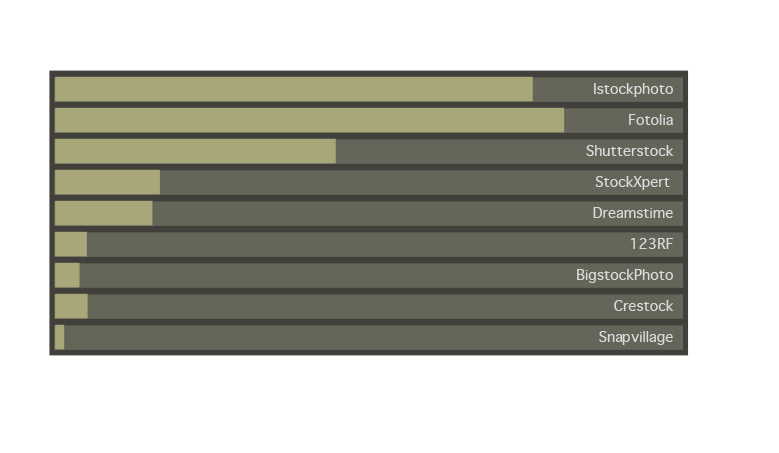
Below you will find a graphic overview of my total income from the different agencies over the last three years of my microstock carrier.
The non-exclusive microstock distribution channel (submitting to a lot of agencies, such as I do) still remains the best income provider, despite the higher commission of the exclusivity offers out there.
Finding where to sign up at these agencies can sometimes be a little difficult, so therefor I have provided links to the sign-up pages at each agency at the bottom of this post. If you use the link below you will become affiliated with me and are entitled to personal guidance by me or my staff. We can do this because we get a tiny percentage of your income if you are affiliated with us.
Income Primo 2008
Income Late 2008
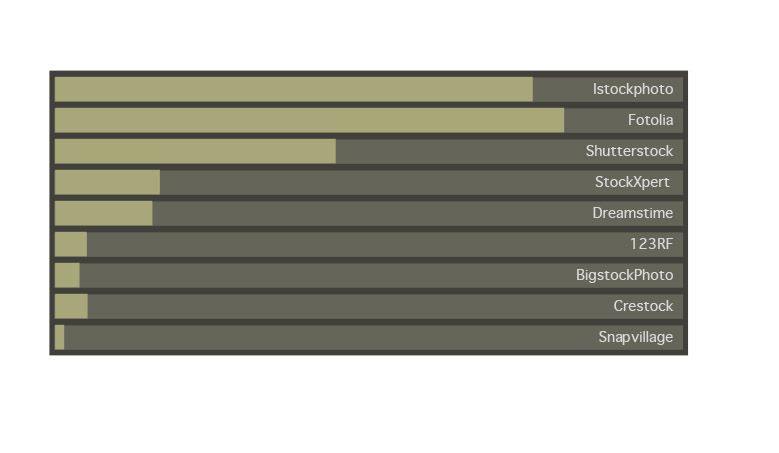
The income speaks for itself but you should always take into consideration the time it takes to organize, upload, attach model releases and assign categories at the different agencies. Some agencies have made it extremely easy to upload and organize your images, including Crestock and 123RF. Other agencies have not thought so hard about this aspect and it can therefor be quite time consuming to get your files submitted for inspection. Files have to be categorized and organized before they are evaluated by the editors where they may or may not get rejected.
If you have just spent hours organizing your files and a lot of them get rejected afterwards it can be quite frustrating. Below I have included the result of a study on average agency online management time consume. (The time it takes to attach model release, categories and so forth once the files are already online).
Uploading time compared to income, (Primo 2008)
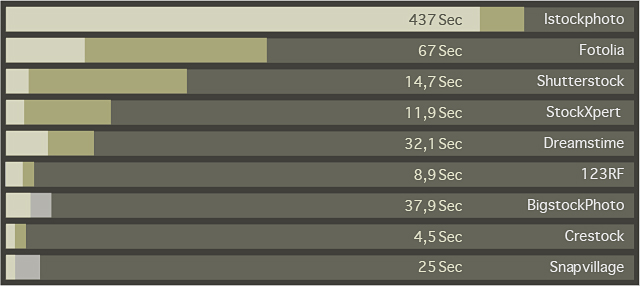
This survey was done by members of my crew as well as independent testers and was highly significant (p < 0.015).
The most cost-efficient (time spent uploading vs income) agency to upload to is Shutterstock, followed by StockXpert and Fotolia. The least cost-efficient is Snapvillage and Istock. This does not mean that you should not submit to these agencies, but just that you should take this into consideration if you have to do all the uploading yourself.
——————————————————–
10. Getting nerdy
I have written a lot about stock photography and below are the related articles that are worth reading if you liked this one. This is technical stuff and very nerdy stock photography theory so don’t worry if you do not understand it. Perhaps 50 people in the world will go “aha….I get this – right on”






Yuri, you’re the best! Thank you for sharing this blog.
Has Found plenty of interesting beside You in блоге.
You Communicate You with russian?
Possible You to write but russian language?
Good luck!
Dear Yuri!
Do you know how Fotolia is going nowadays?
Thanks for your help!
Really interesting article. I am getting prepared to become a stock photographer.
hi Yuri,
your website is full of useful info, its amazing to learn so much in just one hour. i am just starting off in stock photography and relish the challenge, you have taught me so much and i enjoy every shoot even more. thanks very very much. may i ask a quick question i’m upgrading from a canon 350d to either a d300s or d700? help would be great. just a quick answer.
many thanks
Charley
Hello Yuri,
In the section about “Compression mistakes and artifacts” you mentioned saving in tiff format versus jpeg, but would you recommend working and saving in tiff versus psd?
Thanks,
Eric
Thanks for taking the time to construct yet another excellent blog post.
Since I am doing this as a hobby I only really have time to use a single agency and you’ve saved me a lot of time here! Thanks dude 🙂
Pingback: Microstock: A por todos « Penélope Cayero
Hi Yuri
I am starting with all those agencies, not so easy, I would like to answer if you think that if is not to late know to star to do this, I wanted to upload my images via isyndica.com but they are close, do you know any other company who works as well?
Thanks
Best
Gabriela
Congratulation for your success. Can i ask you something? Does i need a model release for every photograph i upload to microstocks that shows the same activity? For example if i shoot a teen eating a sandwitch at different angles or one full body and the other as a headshot, does i need 2 model releases or just one?
great job
You are realy good photographer!
Hello! dgaekab interesting dgaekab site!
Yuri, what would be the best agency to apply to with motorsport photos from a Fujifilm Finepix S1730?
Hello Yuri,
Believe it or not, I’ve just discovered your blog and it’s interesting to see that your advice mirrors my experience with microstock sites. I decided quite a while ago that life was simply too short for Istockphoto’s convoluted upload procedure, especially when compared to the low percentage returns. I notice that your most recent comments about fotolia and istockphoto being about even were made some time ago. Has anything changed since then in your view?
Bill
Yuri thanks for the great photography blog for selling photographers online. As a photographer myself, we strive for the strict technical levels you mentioned. This was an informative well written piece, thanks.
hi there
wow, a friend just sent me a link to your site… so much info! thank you!!
do you have any thoughts, opinions… on getty images?
i’d be most grateful for your input.
and oh my gosh…your studio!! breathtaking!
thanks…Kim
Thanks so much for sharing your knowledge, very generous!
All the best!
Dear Yuri,
Really appreciate your effort.Infact I stepped into your site very accidently,looking for answers which
every person may not be able to provide.I appreciate your openness as well the buisness acumen.
I am from a small city in Kerala,called Trivandrum,at the southern tip of India.
Basically an Engineer by profession,and getting very restless with photography,knowing very well my
certain limitations.I do up load pictures to one of Indian agency called Shot India.
THANKS AND ALLTHE BEST
Very comprehensive Yuri. With the rapid changes the agencies are making with regard to pricing and commission structure, the recommended road keeps developing forks in it.
Yuri, you’re the best! Thank you for sharing this blog.
Для тех, кто ищет спецодежду, оптимально по цене и качеству http://spetsodezhdy.ru/ – фланеливые рубашки, [url=http://spetsodezhdy.ru/]халаты[/url], купить кеды, и многое другое, большой ассортимент.
Pingback: Taking Stock of What You Have: Our May Meeting Wrap-Up | Maine Photographer Coalition
Pingback: Just joined
Excitingly educating – thank you for sharing!
Can’t wait to get going!
Pingback: SBJPG – MINI LECTURE SERIES: Stock Photography | Moshi Moshi Kenji
I love the way that you compare upload time to actual monies made. Wondering, if you would like to submit to stockfuel.com as well. http://stockfuel.com, although smaller, has a great collection of stock photography and is growing. Feel free to upload if you have the chance. Fotolia might be used in the near future, so not sure if that already includes your great collection.
Cheers,
A
I’ve been reading through your advise while taking mental notes of what not to do 🙂
When this was written Pond5 was not included. But now that you are delving into the video aspect of production will you make an update to your review for agencies that also handle video stock? As for myself I produce mainly fractals and some CG 3D slogans. Thank you for taking the time to share some of your insights with regard to the microstock and related fields.
Bruce Berryhill
Fractal Artist & Animator
http://www.allfractup.com
Creator of nearly 100,000 fractal images
16,800 HD VJ loops
300,000 fractal sounds
Hundreds of assorted other videos (CG 3D slogans, deep fractal zooms, self-randomizing HD video art, etc)
http://www.vip-vectors.com … new link with Vector illustrations, started now 🙂
Hello Yuri,
Whats your opinion on Getty Images? Ive been invited to join Getty via some of my images on Flickr but am wondering if its a good invitation to accept to sell stock photography with them? I still need to submit my images to them and get model releases ect, but I noticed it wasnt mentioned in your article so am wondering what you think of them as a agency?
Hi Yuri,
Very interesting reading on your site. Thank you for sharing info.
Fabulous pictures!
Ragards Jakke R.
Very usefull information thank you very much. I have a question.
I am making photos, but the biggest part of my work is illustration. Not like ribbons or web-elements, something more time-taking and less selling.
I was thinking if it is more useful to go to macrostocks. I dont think they will sell many times even at Shutter. I think it is better to have more money selling them for bigger fee.
Can You advise some good macrostocks with good balance between % and sells?
Pingback: Fotolia launches stock accumulation from DeviantArt | Craft Idea
i have pics of me walking a huge tiger in thailand. do you think i should try and upload or no?
Pingback: Thoughts of a Bohemian » Blog Archive » Before it tips
Great info …. looks like I have a lot of work ahead of me – lol
Wow, some awesome blog.
Yuri,
A very interesting read, and most informative. Thank you.
Hi
Thank you for all the information.
What are your thoughts on Alamay has agency
thanks
Rob.
Pingback: Cathern Husseini
Thanks for this article.
Now in 2013 there are many changes in the microstock industry and this article have to be update.
Hello Yuri, I’m beginner on microstock industry please take a look my web also if you wanna trough many place in Indonesia don’t be hesitate to contact me, alright, how about to make model release or talent release, what is the difference??
Thanks